Routing with URL Querystrings
Lesson Intro
We’ve got a lot of the groundwork laid for HTML (structured data/content), CSS (layout and visual language), and PHP (any programs we want the computer to run).
And you’ve recently fought a pretty tough battle with “making things look right.” Pretty cool.
Now it’s time to talk about how you might handle say, hundreds of dynamic pages. We’ll be building our own mini data-driven templating system. Ready!?
The goals
-
Reflect on how much we've learned so far
Remember when all of the code was scary and you couldn’t “make stuff go where you wanted?” So, you know that it’s really just about exposure and practice.
-
Start the PHP framework architecture project
Most of your projects so far have only been a few pages. We’ll be building a dynamic system that can handle unlimited pages. You’ll need to pick a project idea over the next few days.
-
Go over the concept of a dynamic "detail" page
Most sites have a list of resources and when you click that resource it dynamically builds that items detail page.
-
Introduce querystrings and the $_GET superglobal
When you request a URL, you can also send some data along with that request and change how the page works.
You can just watch this video like TV. Let the ideas sink in. Relax. It’s a lot of new stuff – but also, only 1 new concept and a few new lines of code.
Sending data along with your webpage request
-
PHP
Passing data along with your request
<?php

// given the URL
// https://site.com/?someKey=someValue

$thingYouCanUse = $_GET['someKey']; // "someValue"


// given the URL
// https://site.com/?favoriteFruit=Banana

$theFavorite = $_GET['favoriteFruit']; // "Banana"
You can pass along some data with your URL request. Guess what! It’s key:value pairs like everything else! 😉
?will signify the start of the querystring. The=will connect the pair. You can also send many pairs by putting a&between each.When you post your form, it gets stored in the
$_POSTarray.When you get a URL and send along some data, it gets stored in the
$_GETarray.Spend a little time with that idea before you type it up.
-
PHP
A simple router with query strings
<?php

// https://site.com?page=myPageName
// assuming a URL structure like this

$page = 'home'; // maybe you have a default

if ( isset( $_GET['page'] ) ) {
	$page = $_GET['page'];
}


// then, later where you'll include page templates...

if ($page === 'home') {
	include('home.php');
}

if ($page === 'list') {
	include('list.php');
}

if ($page === 'myPageName') {
	include('myPageName.php');
}
What is returned is just a
stringand although it feels a little more complex (because it’s new) – it’s more important that ever to remember that you’re making all of these dynamic decisions based on that simple string of characters.All of the same things we’ve been working with are going to apply.
-
PHP
Server-side query string preview
echo $_SERVER['QUERY_STRING'];The little URL bar in your browser usually cuts off these longer URLs! So, there are many ways you could figure out how to show the URL on your page (and see the whole thing / so that it’s not hidden while you work!). Here’s one such way.
Note
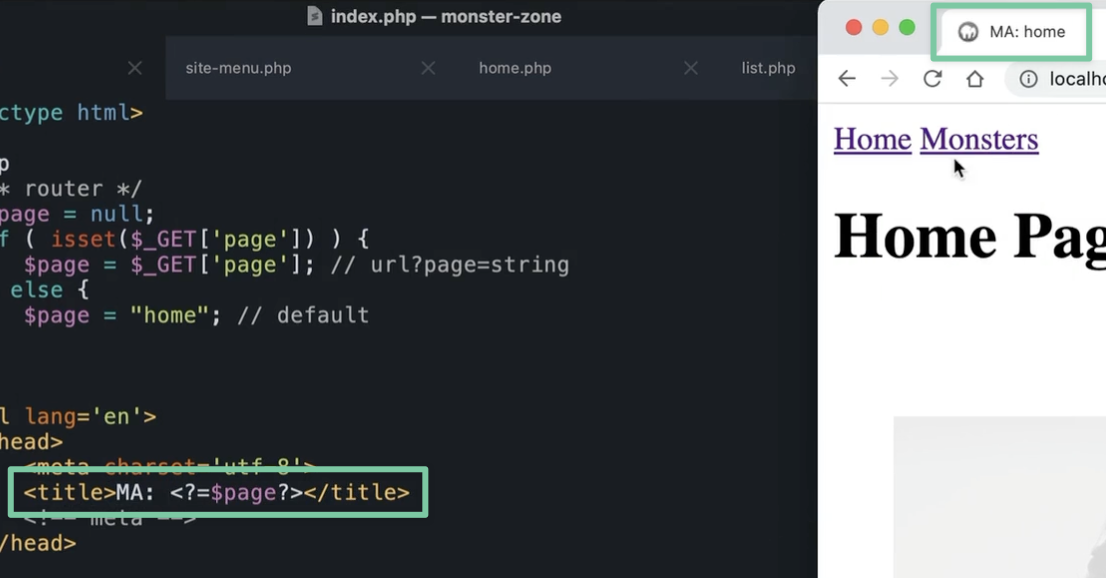
This isn’t actually so great for screen readers.
The company probably wants to push their brand name up front… but you wouldn’t want to hear “coca-cola: home” “coca-cola: about” “coca-cola…coca-cola” … and people who are using screenreaders move fast. They want to know the page name. Not the brand name.
Cheatsheet
This should be everything you need to complete the challenges / and make your deliverables. Fight the urge to go back to the video or to look for answers elsewhere. You have the tools. Now you need to just do it until it clicks. You can print this out. It’ll be a nice low-tech helper.
Exercises
-
Watch the video
It’s OK to just watch it like TV. You don’t have to follow along. Just let it soak in.
-
Figure out what you'd like to make your project about
It can be anything you like. Almost everything – is a list of “things.” What is your thing going to be for this project? Think about your big picture goals. (It can be your personal website!)
-
Start building out your project
You can use your boilerplate to start. You already have a lot of starter files, resets, etc.
Or it might be better for you to type it all out for practice. Figure out what to do. Ask for help.
Project ideas
Almost everything – is a “list of stuff.” Pick out some stuff you want to work with – and keep on moving. : )