Routing with URL Querystrings
Workshop Intro
We’ve got a lot of the groundwork laid for HTML (structured data/content), CSS (layout and visual language), and PHP (any programs we want the computer to run).
And you’ve recently fought a pretty tough battle with “making things look right.” Pretty cool.
Now it’s time to talk about how you might handle say, hundreds of dynamic pages. We’ll be building our own mini data-driven templating system. Ready!?
UX goal: draft
A student can:
- work through the lesson
- see whether it is done or waiting for review, and when it was last updated
- mark it complete, or submit a checkpoint for review
- get back to the program
Workshop goals
-
Reflect on how much we've learned so far
Remember when all of the code was scary and you couldn’t “make stuff go where you wanted?” So, now that you’ve nearly mastered layout – you know that it’s really just exposure and practice.
-
Go over the concept of a dynamic "detail" page
Most sites have a list of resources and when you click that resource it dynamically builds that items detail page.
-
Introduce "superglobals" and "query strings"
When you request a URL, you can also send some data along with that request and influence how the page works.
-
Start the PHP framework architecture project
Most of your projects so far have only been a few pages. We’ll be building a dynamic system that can handle unlimited pages. You’ll need to pick a project idea over the next few days.
You can just watch this video like TV. Let the ideas sink in. Relax. It’s a lot of new stuff – but also, only 1 new concept and a few new lines of code.
You can ask the server for the webpage, right?
The browser is really just a form. You put in an address – and it makes a request to that domain which leads to an IP address which leads to a computer somewhere with a server running on it. That server software is waiting for requests like yours – so it can build you up a web page and send it back (or whatever it’s designed to do).
But! You can also send alone some extra data with your request.
php
Server-side query string preview
echo $_SERVER['QUERY_STRING'];There are a few behind-the-scenes magic variables that just exist — and you can use. They call them “SUPER GLOBALS!!!” but they’re just little lists of values.
This one retains info about the request: the URL, the method, the user-agent, the IP.
Retrieve useful info about the request with keys/strings like: 'REQUEST_METHOD', 'REQUEST_URI', 'QUERY_STRING', 'HTTP_USER_AGENT'.
Server query string
If you type in a ? after the website address in your URL bar and some text after like ?this-and-that-and-this , then it’ll send that along for the server to work with.
php
Passing data along with your request
<?php

// given the URL
// https://site.com/?someKey=someValue

$thingYouCanUse = $_GET['someKey']; // "someValue"


// given the URL
// https://site.com/?favoriteFruit=Banana

$theFavorite = $_GET['favoriteFruit']; // "Banana"
You can pass along some data with your URL request. Guess what! It’s key:value pairs like everything else! 😉
? will signify the start of the querystring. The = will connect the pair. You can also send many pairs by putting a & between each.
When you post your form, it gets stored in the $_POST array.
When you get a URL and send along some data, it gets stored in the $_GET array.
Spend a little time with that idea before you type it up.
Working in-page PHP example
Go ahead and add ?name=something in the mini browser and make a GET request to the server.
Every unique URL counts as a new unique request, so it busts cache which you might remember from earlier in the course when you were testing your site’s meta share images.
Try a few different types of queries. You can send more than one with an & sign: ?a=apple&b=banana
Sending data along with your webpage request
-
php
A simple router with query strings
<?php

// https://site.com?page=myPageName
// assuming a URL structure like this

$page = 'home'; // maybe you have a default

if ( isset( $_GET['page'] ) ) {
	$page = $_GET['page'];
}


// then, later where you'll include page templates...

if ($page === 'home') {
	include('home.php');
}

if ($page === 'list') {
	include('list.php');
}

if ($page === 'myPageName') {
	include('myPageName.php');
}
What is returned is just a
stringand although it feels a little more complex (because it’s new) – it’s more important that ever to remember that you’re making all of these dynamic decisions based on that simple string of characters.All of the same things we’ve been working with are going to apply.
Note
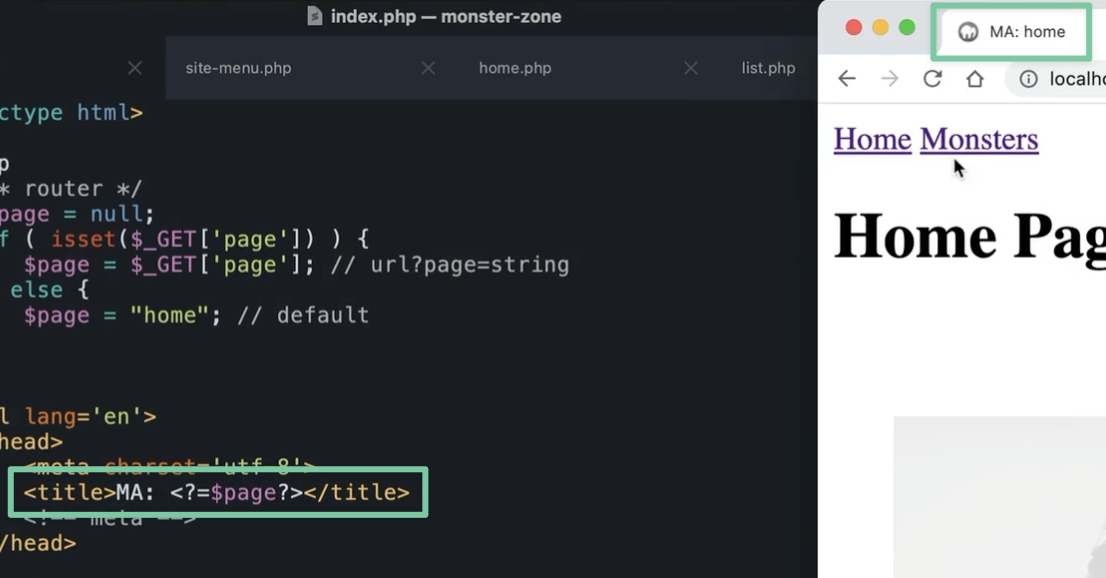
This isn’t actually so great for screen readers.
The company probably wants to push their brand name up front… but you wouldn’t want to hear “coca-cola: home” “coca-cola: about” “coca-cola…coca-cola” … and people who are using screenreaders move fast. They want to know the page name. Not the brand name.
Exercises
-
Watch the video
It’s OK to just watch it like TV. You don’t have to follow along. Just let it soak in.
-
Figure out what you'd like to make your project about
It can be anything you like. Almost everything – is a list of “things.” What is your thing going to be for this project? Think about your big picture goals. (It can be your personal website!)
-
Start building out your project
You can use your boilerplate to start. You already have a lot of starter files, resets, etc.
Or it might be better for you to type it all out for practice. Figure out what to do. Ask for help.
Project ideas
Almost everything – is a “list of stuff.” Pick out some stuff you want to work with – and keep on moving. : )